
Launcher iOS 26
LuuTinh DeveloperPersonalization
4.72.36K Reviews
- Version
- 8.8.1
- Installs
- 10.00M
- Age Rating
- Everyone
Screenshots
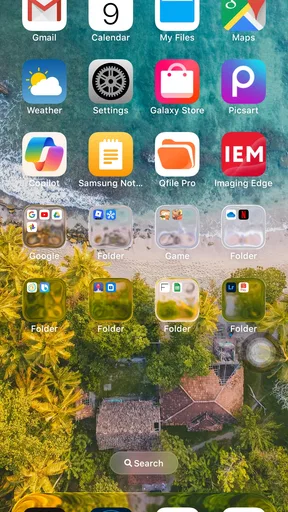
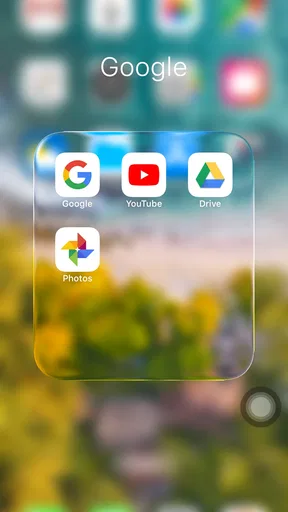
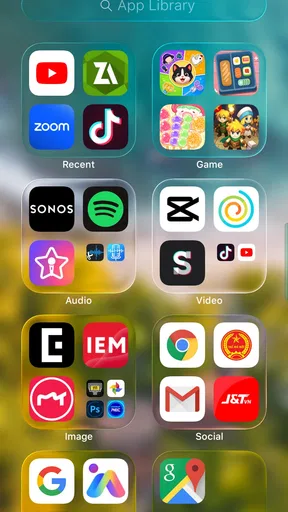
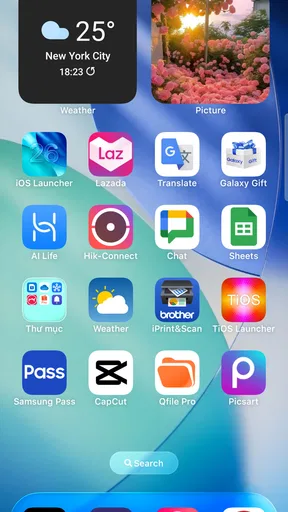
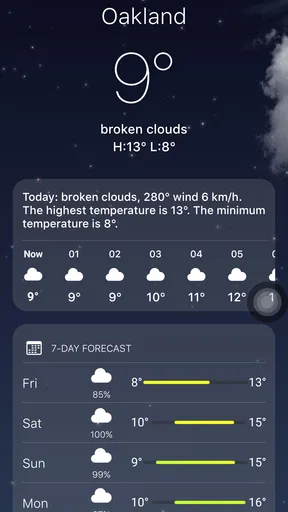
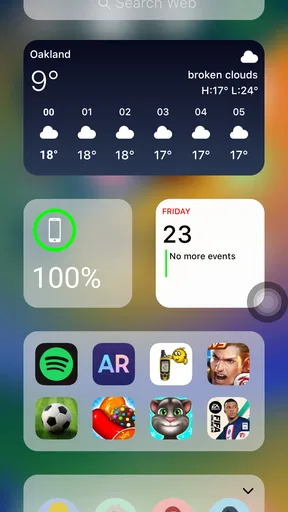
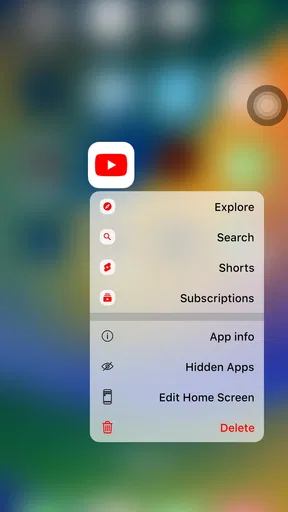
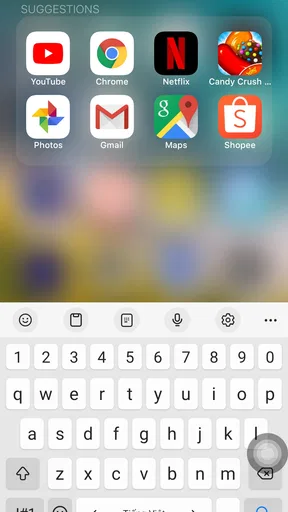
Our Review of Launcher iOS 26
 Analysis by Appyee
I tried Launcher iOS 26 as a way to give an Android phone a more iPhone-like appearance without replacing the phone itself. My first impression was that it is less about adding a single visual theme and more about changing the everyday relationship with the home screen. Icons, spacing, gestures, and the general presentation are all aimed at a smoother, more elegant iOS-style experience. That makes it interesting for someone who likes Apple’s visual language but wants to keep using Android hardware and Android apps.
This is a free personalization app from LuuTinh Developer, available for devices running Android 5.0 or later. It is rated for Everyone, which makes it approachable for a broad audience. The app has reached over 10 million installs and holds a 4.7 average from around 278 thousand ratings, so it is clearly not a niche experiment. Still, popularity does not automatically make it the right launcher for every Android user. The important question is whether the visual change is worth giving up some of the familiarity and flexibility of your current launcher.
What to consider before changing your home screen
When I judge a launcher like this, I look beyond the first screenshot. A home-screen replacement becomes part of nearly every phone interaction: unlocking the device, opening an app, searching for something, checking notifications, and moving between pages. A design can look impressive for ten minutes and become irritating after a week if navigation feels slower or if common Android habits no longer work as expected.
Launcher iOS 26 is most appealing if your decision starts with appearance. If you enjoy the clean, tightly organized look associated with iPhones, this app gives your Android device a noticeably different personality. It can also be useful when you are tired of the default interface supplied by your phone manufacturer but do not want to spend time building a completely custom setup from individual icon packs, widgets, and settings.
On the other hand, I would not choose it simply because it has “iOS” in its name. It does not turn Android into an iPhone, and that distinction matters. Your phone remains an Android device underneath the visual layer. Android settings, app behavior, system notifications, and manufacturer-specific tools still exist. The launcher changes the front door of the phone, not the entire operating system.
The practical decision is therefore quite simple: choose it when visual consistency and an iOS-inspired layout matter more to you than preserving every familiar Android shortcut. If you prefer deep control over grids, folders, gestures, widgets, and icon placement, a customization-focused launcher may be a better match. If you want the least possible change, staying with the phone’s original launcher will usually be more comfortable.
How the first setup feels
Installing a launcher changes a central part of Android, so I recommend treating the first setup as a trial rather than a permanent commitment. I kept my expectations modest and checked how the home screen behaved with the apps I use most often. That approach is useful because a launcher can look excellent with a clean demonstration layout but feel less convincing once your real collection of work, travel, banking, messaging, and media apps is placed on it.
The biggest adjustment is mental. Android users are often accustomed to a home screen that freely mixes widgets, folders, shortcuts, and app icons. An iOS-inspired arrangement encourages a more uniform presentation. I found that the result looks tidier when I resist the urge to fill every available space. A small number of frequently used apps on the first page makes the design feel intentional; copying every app onto the front page makes it look crowded and reduces the benefit of the cleaner style.
Before switching, I suggest taking a screenshot of your existing home screen and noting where your essential apps are located. This is not because the process is complicated, but because a familiar layout is easy to miss after changing it. I also recommend testing the launcher during a normal day rather than judging it only while sitting at home. Opening a navigation app in a hurry, replying to a message, or searching for a rarely used tool will reveal more than simply admiring the icons.
Where the iOS-inspired approach works best
The strongest part of Launcher iOS 26 is its clear visual direction. Many Android launchers try to serve every possible preference, which can leave the interface looking inconsistent unless the user spends time adjusting it. This app starts from a recognizable idea: make Android feel closer to the visual rhythm of iOS. For people who already like that style, the shorter path to a coherent look is a real advantage.
I especially see the appeal for Android owners who have moved between phones from different manufacturers. Each brand can arrange settings, icons, and home-screen behavior differently. A consistent launcher gives the front of the phone a more stable identity when changing devices. It will not make every system screen identical, but the part of the phone used most often can feel more familiar.
It is also a practical option for someone who wants to show an Android phone to friends or family members who are comfortable with iPhones. The visual resemblance may reduce the initial learning curve for basic home-screen actions. I would still explain that the underlying menus and system controls remain Android-specific, but the presentation can make the device feel less unfamiliar.
Another useful scenario is a temporary visual refresh. If your phone still works well but feels stale, changing the launcher can make it seem new without buying another device. I would use this approach for a secondary phone, a spare device, or an older handset that needs a more pleasant daily interface. Because the app is free, experimenting carries less financial risk than purchasing a new theme or committing to a paid customization suite.
Small workflow choices that make a difference
One of my more useful discoveries was that the launcher looks better when I organize by frequency rather than by app category alone. Instead of creating many folders immediately, I placed the apps I open several times a day where my thumb naturally reaches them and moved occasional tools away from the first screen. This preserves the uncluttered appearance while keeping the phone practical.
A second tip is to separate visual testing from productivity testing. On the first day, I focused on whether the layout looked right. On the next few days, I paid attention to whether I could find less-used apps quickly and whether my normal Android habits still felt natural. This two-stage check prevents the attractive appearance from hiding small annoyances that only appear during routine use.
A third trade-off concerns familiarity. The closer the layout feels to iOS, the more you may need to adapt if your previous Android launcher exposed a large app drawer, extensive widget controls, or manufacturer-specific shortcuts directly on the home screen. I found it helpful to keep the most important Android tools accessible while allowing the launcher to handle the visual presentation. Trying to force every old habit into the new layout defeats the purpose of switching.
For a family member who is not confident with technology, I would configure the first screen before handing over the phone. A simple arrangement with communication, camera, contacts, and essential utilities is easier to learn than a page filled with every installed app. The app’s visual simplicity can help, but the final experience still depends heavily on how thoughtfully the home screen is arranged.
Performance, compatibility, and everyday friction
The current version is 8.8.1, and the broad Android support beginning with version 5.0 is useful for owners of older devices. That does not guarantee identical behavior on every phone, because Android interfaces differ between manufacturers and system versions. A launcher may also interact differently with navigation settings, notification behavior, or device-specific home-screen controls.
My advice is to test the areas you actually depend on before making the switch permanent. Check how you return to the home screen, how you search for an app, how you open recent apps, and whether your usual notification routine still feels comfortable. These actions are more important than a polished first impression. If one of them becomes awkward, the visual resemblance may not compensate for the inconvenience.
There is also a general cost to using any third-party launcher: it becomes another layer between you and the system. When something feels different, it may not always be obvious whether the cause is the launcher, Android itself, or the phone manufacturer’s interface. That is not a reason to avoid Launcher iOS 26, but it is a reason to keep your previous setup in mind while testing it.
I would also avoid changing several personalization tools at the same time. If you install a new launcher, an icon pack, extra widgets, and gesture utilities together, it becomes difficult to identify what is helping and what is causing friction. Launcher iOS 26 is easier to evaluate when it is tested on its own first. Once the basic experience feels stable, you can decide whether additional customization is genuinely necessary.
How it compares with the usual Android alternatives
The main alternative is the launcher already installed on your phone. That option usually wins on familiarity and integration. It is the sensible choice for users who depend on manufacturer-specific widgets, branded shortcuts, or a carefully arranged home screen that already works well. There is no learning period, and switching back is unnecessary because nothing changed.
A second category is the highly customizable Android launcher. These launchers are better for people who want precise control over icon size, page structure, gestures, folders, widgets, and visual details. They can produce an iOS-like appearance, but usually require more manual work. If you enjoy adjusting every part of the interface, that extra effort may be a benefit rather than a drawback.
A third category includes minimalist launchers that reduce visual distractions and focus on quick access to a short list of apps. Those may be a better fit if your real goal is fewer interruptions rather than an iPhone-inspired design. Launcher iOS 26 creates a particular aesthetic; it is not necessarily the best tool for someone trying to make the phone feel almost invisible.
There are also theme and icon-pack combinations. They can change the appearance while allowing you to keep your preferred launcher, which is useful when you like your current gestures and widgets. The disadvantage is that the result may feel less unified, and some setup work is usually involved. Launcher iOS 26 is more convenient for users who want the overall direction handled in one place rather than assembled piece by piece.
The real cost of switching
The financial barrier is low because the app is free, but switching still has a time cost. You may need to rearrange apps, relearn where things are, and decide whether the new layout deserves to replace the old one. For a phone used heavily throughout the day, even small changes in muscle memory can be noticeable.
There is also a risk of confusing visual novelty with lasting improvement. The first few hours can feel exciting simply because the phone looks different. I recommend waiting until the novelty fades before deciding. If you still find the home screen easier or more pleasant after ordinary tasks, the change is doing something useful. If you keep searching for the old app drawer or undoing the new arrangement, the original launcher may be the better choice.
Switching back should be part of your plan. Keep your previous launcher available until you are satisfied, and do not delete your old arrangement before testing the new one. This is especially important on a work phone, where an unexpected interface change can slow you down at the wrong moment. A short trial on a personal or secondary device is the safest way to judge it.
Privacy and permissions are also reasonable points to consider with any app that becomes central to the home screen. I would review the access requests shown on your device and only enable what you understand and need. The launcher’s visual goal does not require you to ignore normal Android safety habits. If a requested access seems unrelated to the way you intend to use the app, pause and investigate before continuing.
Who should use it, and who should skip it?
I recommend Launcher iOS 26 to Android users who genuinely like the iPhone-inspired look, want a quick visual refresh, and do not need every advanced Android customization option exposed on the home screen. It is particularly suitable for people moving from an iPhone to Android who want a gentler visual transition, or for anyone helping another person become comfortable with an Android device.
I would be more cautious recommending it to power users who have spent time perfecting a complex launcher setup. If your daily workflow depends on specialized gestures, dense widgets, extensive folders, or manufacturer tools, a more configurable launcher may serve you better. Likewise, if your priority is maximum battery efficiency, distraction reduction, or absolute system integration, you should compare those goals against the appeal of the new appearance rather than assuming the iOS style is automatically an improvement.
The age rating of Everyone makes it broadly accessible, and the free price makes trying it straightforward. Still, accessibility is not the same as universal suitability. Someone who needs large, highly customized controls may prefer a launcher designed around accessibility or simplicity. Someone who wants an exact iPhone experience may also be disappointed, because the app changes the Android presentation without changing Android’s underlying behavior.
My recommendation after using it
Launcher iOS 26 succeeds when treated as a focused visual transformation rather than a complete operating-system replacement. I like the fact that it gives Android a recognizable iOS-inspired identity without asking the user to build every detail manually. Its strongest value is convenience: it offers a coherent starting point for people who want that look and do not want to spend an evening assembling themes and layout settings.
My recommendation is to install it as a reversible experiment. Set up only the apps you use most, test the phone during a normal day, and pay attention to navigation rather than screenshots. If the cleaner presentation makes you feel more comfortable every time you unlock the phone, keep it. If you miss the flexibility or speed of your original launcher, switch back without guilt.
With its free access, broad Android compatibility, Everyone rating, and strong user response, Launcher iOS 26 is an easy app to try for personalization. I would choose it for an iOS-style makeover, not for deep Android power-user control. For the right person, that distinction is exactly why it works: it does one clear job, makes the front of an Android phone feel different, and avoids demanding a complete change of device.
Verdict
Strengths of Launcher iOS 26
- Gives Android phones a familiar iPhone-style home screen
- Includes iOS-inspired icons, widgets, and control center
- Offers several customization options for layout and appearance
- Can make older Android devices feel visually refreshed
- Easy to install and try without replacing the Android system
Limitations of Launcher iOS 26
- Contains ads that may interrupt setup or regular use
- Some features require extensive accessibility permissions
- Performance can vary on budget or older Android devices
- iOS-style behavior may feel less flexible than standard launchers
- Privacy depends on how third-party permissions and data are handled
Similar Picks in This Category
View All
Microsoft SwiftKey AI Keyboard
SwiftKey4.3

Wallpapers
Google LLC4.1

Zedge™ Wallpapers & Ringtones
Zedge4.7

Yandex Browser with Alice AI
Direct Cursus Computer Systems Trading LLC4.3

Ringtone Maker:create ringtone
Big Bang Inc.4.7

Fonts Keyboard
Fonts Keyboard3.9
Frequently Asked Questions
What is Launcher iOS 26, and what does it do?
Launcher iOS 26 is an Android customization app designed to give your phone an iPhone-inspired appearance. After installation, it can change the home-screen layout, icons, wallpapers, folders, animations, and other visual elements to resemble iOS. It does not turn Android into a real iPhone or install Apple’s operating system; it mainly provides a themed launcher experience while your device remains Android underneath.
Is Launcher iOS 26 safe to install and use?
The app should be downloaded from a reputable source, preferably the official Google Play listing, because unofficial APK files may be modified or contain unwanted software. During setup, review every permission request carefully. A launcher may need access to display the home screen and manage shortcuts, but requests unrelated to its core function deserve caution. Also check the developer name, recent reviews, update history, and privacy information before installing.
Can Launcher iOS 26 slow down my Android phone or drain the battery?
Performance depends on your phone’s hardware, Android version, and the launcher settings you enable. On newer devices, basic use is generally smooth, although animated transitions, live wallpapers, notification badges, search tools, and extra widgets may consume additional memory or battery. Older or entry-level phones can experience occasional delays. If that happens, disable unnecessary animations and effects, or switch back to your phone’s default launcher.
Will Launcher iOS 26 replace my current launcher, and can I uninstall it later?
During setup, Launcher iOS 26 may ask you to make it the default home app. You can usually accept this temporarily or change the default launcher later through Android’s Settings, under Apps or Default apps. Your personal files, installed applications, contacts, and messages should remain unaffected. To remove it, select another launcher as default first, then uninstall the app normally from Settings or the Play Store.
Does Launcher iOS 26 provide genuine iPhone features and Apple services?
Launcher iOS 26 can imitate selected visual elements, such as an iPhone-style home screen, icons, control panel, lock-screen appearance, or search interface, depending on the version and available tools. However, it cannot provide genuine iOS functions, Apple-exclusive security, iMessage, FaceTime, AirDrop, or the App Store. Some simulated panels may also require additional permissions, so use them only when you understand what access they request.
